Showing posts with label MINECRAFTMODS. Show all posts

Mods Enhanced Portals 1.6.4


Enhanced Portals 3
Enhanced Portals. Do you like some other portal mods, but feel that lack certain functionality, customization, or are way too easily achievable for instantaneous transportation? EnhancedPortals 3 tries to solve all of these issues by offering up some unique and powerful features.
Enhanced Portals started out as a mod designed to give you a bit more customization for your Nether portals. You could increase the size, shape, or change it’s colour. Enhanced Portals 3 takes this even further by leaving behind the focus of being a fully functional, boring, Nether portal.

Enhanced Portals 2
If you need to contact me you can find me on #EnhancedPortals on irc.esper.netEver wanted to build a Stargate? Don't like the fact that portals can only be one shape? Find it annoying that your 3 block wide paths don't line up correctly with your Nether portal? Do you want your portals to go somewhere other than the Nether?Enhanced Portals allows you to create any size or shape Nether portal that you want. Unlike other mods, this mod has no limit on the size of the portal you want to create - as long as it's a valid portal (a frame of obsidian with nothing else in the way) - you're good to go.What if you don't like the boring purple colour portal? Simply take any one of the 16 dyes and use it on the portal, the dye will get used up and the portal will become that colour. You can even use these portals as decoration.

Crediys: Alz454

How to install
Enhanced Portals 3
Requirements
Minecraft Forge
CoFH Core
Installation
Put CoFHCore into your Mods folder.
Put EnhancedPortals_3.x.x.jar into your Mods folder.
If you’re not using Thermal Expansion or a mod that can output RF, you will need to set I:PowerMultiplier to 0 in EnhancedPortals3.cfg.

Enhanced Portals 2
To install, install Forge and put all downloaded files into your Mods folder.Dependencies: Minecraft Forge, EnhancedCore.All downloads and changelogs can be found on my
Minecraft mods:
Enhanced Portals 3
Enhanced Portals 2
Read more

Mods Super Villains 1.6.4


Super Villains Mod which adds three new and evil super villains into your game. Wear the costumes and gain the powers of Venom, Loki and Scarecrow to bring pain to the world of Minecraft!

Features:
R – Fire various abilities
Venom = web shoot
Loki = Chitauri Bolt
Scarecrow = Fear Toxin
How to install
Download and install Minecraft Forge
Download the mod
Put downloaded zip file into C:\Users\YOURUSERNAME\AppData\Roaming\.minecraft\mods folder. Do not unzip it. If you don’t have a mods folder, create one

Note: If there are ID conflicts with other mods, go into /config folder and find the SVIM config file. Open with any text editor and edit the values.

Credits: Colossali
Minecraft mods
Super Villains 1.6.4
Super Villains 1.6.2
Super Villains 1.5.2
Super Villains 1.5.1
Super Villains 1.5
Super Villains 1.4.7
Read more

Minecraft mods Dynamic Mazes

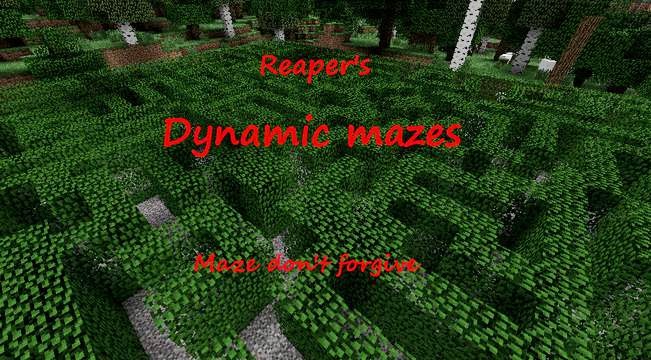
This mod adds Mazes filled with treasures, monsters and deadly traps! However, they are dynamically generated, so every maze differs from the others. They are quite rare, so be patient in searching Posted Image Also, there are newly added underground mazes! They are located under the largest surface mazes and are filled with even more dangers!


1.3 - As we have 1.6.4 for some time and ModLoader still hasn't been updated, I decided to make change I was planning for a long time now. I rewrote the mod for Forge. It should now work even in SMP, but I would like if someone could confirm that.
Block ID's and rarity of mazes are changeable via config file located in .minecraft/config/dynamicmazes. Warning: If you change ID's of blocks you already have in your world, the blocks in your world will be replaced/deleted. There is no way to prevent this, so change ID's with caution!
Each maze consists of 7x7 parts, which are randomly chosen from inner database and randomly rotated. The whole maze is then assembled. There are also three new blocks - Bush, Wolfspawner and gravel pressure plate. Bush looks like leaves, but is harder to destroy, don't decay and can be harvested using shears. Second block is similar to Mob Spawner, but it spawns wolves. Gravel pressure plate is basically common pressure plate but with gravel texture. Spawners are randomly generated under the maze, chests have random chance to spawn on fixed locations. I also added deadly traps waiting for you. There are  underground mazes located under the largest surface mazes waiting for you! But they are very rare and the entrance is well hidden. The most stubborn treasure seekers can even found sercet tomb!

Link Forum

Credits: -Reaper-

New block id's: 180,181,182 Changeable
Requires: Forge
Installation:
To install Dynamic Mazes, go to C:/Users/Yourusername/AppData/Roming/.minecraft/mods/ and put the whole archive(do not unzip it!) into this folder.
If the folder mods is not there, launch Minecraft after installation of Forge once and it should create the folder.

Minecraft free download: Mods Dynamic Mazes 1.6.4
Minecraft free download: Mods Dynamic Mazes 1.6.2
Minecraft free download: Mods Dynamic Mazes 1.5.2
Minecraft free download: Mods Dynamic Mazes 1.5.1
Minecraft free downloadMods Dynamic Mazes 1.4.7
Minecraft free download: Mods Dynamic Mazes 1.4.6
Minecraft free download: Mods Dynamic Mazes 1.4.5
Minecraft free downloadMods Dynamic Mazes 1.4.4
Minecraft free download: Mods Dynamic Mazes 1.4.2
Minecraft free download: Mods Dynamic Mazes 1.3.2
Minecraft free download: Mods Dynamic Mazes 1.3.1
Minecraft free download: Mods Dynamic Mazes 1.2.5
Minecraft free downloadMods Dynamic Mazes 1.2.4
Read more

Minecraft mods Alternate Terrain Generation 1.6.4

ATG adds a new world type which entirely replaces the base method of creating the world.
Vanilla generation creates "blobs" of land within the world and assigns random biomes to each, shuffling them around a bit to add rivers and such. The height and shape of terrain within these areas is determined by the biome, not the rest of the world.


ATG currently supports any mod which adds their biomes via the provided API, and Buildcraft explicitly since there are only 2 small biomes to add. Right now, Biomes'O'Plenty dev builds support ATG, and the makers of both EBXL and Highlands have said they intend to support it soon. Anyone wishing to add support for their mod biomes is quite welcome, and can find the API in the downloads section.

Simple as that!
Make sure to check the atg.cfg file in your config folder for options.
If you want to run ATG on a server, set the level-type in the server.properties to "ATG" and start a new world (level-type changes only take effect when a new world is generated).

How do I use it
Simply place the zip into your mods folder like any other forge mod, and then make sure to select "ATG - Alternate" as the world type when making a new world.

Development (unobfuscated) version:
Download ATG 0.9.3 DEV for Minecraft 1.6.x *
Minecraft free downloadMods ATG 0.9.3 for Minecraft 1.6.x 
Minecraft free download: Mods ATG 0.2.1 for Minecraft 1.5.2
Read more

Minecraft mods 1.6.4 Dota 2 Items

Still a work in progress, Dota 2 Items Mod aims to recreate items from Dota 2 in Minecraft with the same look-and-feel (16 pixel Minecraft style). That includestextures, sounds, particle effects, cooldown, charges,usage mechanicsredesigned to suit Minecraft, and, of course,item crafting.


Dota 2 Items are not dropped on death, and when you respawn you receive all of Dota 2 Items you had before dying. Passive effects are accumulated from all 9 items currently in your inventory hot bar.

You get gold coins for killing mobs and other players as wells as at a constant but slow rate, like in Dota. Some coins drop on death, the amount depending on your level.The Dota 2 Shopkeeper NPC spawns in every village. From him you can buy or sell Dota 2 Items for gold coins.
Default attack speed is lowered compared to Minecraft. You can land one blow in 1.3 seconds with 0 Agility.
This mod should be single player and multiplayer compatible.
How to Install
1. If you haven't already, download and install Minecraft Forge: http://www.minecraft...ation/Universal
2. Download the Dota 2 Items mod:
v0.8.3 for Minecraft v1.6.x: http://adf.ly/ZUDvY
old mod v0.5.3 for Minecraft v1.5.2: http://adf.ly/455455...-v053-for-mc152
3. Download the required LibSchematic mod:
for Minecraft v1.6.x: http://adf.ly/WeLEC
4. Copy both zip files into your .minecraft/mods folder

Credits: Hunternif
Minecraft for free: Mods Dota 2 Items  v0.8.3/1.6.4
Minecraft for free: Mods Dota 2 Items 1.5.2

Read more